

Many London SMEs are still running on-premises email servers, legacy file shares, or fragmented cloud tools that were never designed to work together. A Microsoft 365 migration resolves all of that in a single, planned transition, replacing scattered systems with one integrated platform covering email, document management, video conferencing, and security. The question is not whether to migrate, but how to do it without disrupting operations, losing data, or exposing the business to security gaps in the process. This guide sets out exactly what a well-managed migration involves, what decisions a business owner must make, and what distinguishes a smooth transition from an avoidable failure.
Table of Contents
- Quick Takeaways
- What Microsoft 365 Migration Involves
- Migration Methods Compared
- Planning Your Migration: The Steps That Matter
- Common Mistakes That Derail Office 365 Migration Projects
- Security and Compliance During Migration
- Choosing a Microsoft 365 Migration Consultant
- Frequently Asked Questions
- References
Quick Takeaways
| Key Insight | Explanation |
|---|---|
| Migration method depends on mailbox count and source system | Cutover migration suits organisations with fewer than 150 mailboxes. Staged and hybrid approaches are better for larger or more complex environments. |
| Pre-migration assessment is not optional | Auditing existing data, user accounts, and dependencies before the move is the single most effective way to prevent post-migration failures. |
| Security controls must be activated before go-live | Multi-factor authentication, conditional access, and data loss prevention policies should be configured in the target tenant before any mailboxes are cut over. |
| User communication directly affects adoption | Staff who receive no preparation before a migration generate significantly more support tickets and revert to old habits, undermining the return on investment. |
| Tenant-to-tenant migration carries distinct complexity | Moving between two Microsoft 365 tenants, typically after a merger or acquisition, requires careful identity mapping, domain reassignment, and permissions alignment. |
| Archived email must be planned for explicitly | Failing to account for email archives during migration planning can result in data loss or compliance failures, particularly in regulated sectors. |
| A managed IT provider adds measurable value | An experienced Microsoft 365 migration consultant handles licensing, configuration, security, and cutover scheduling in one engagement, reducing internal resource pressure. |
What Microsoft 365 Migration Involves
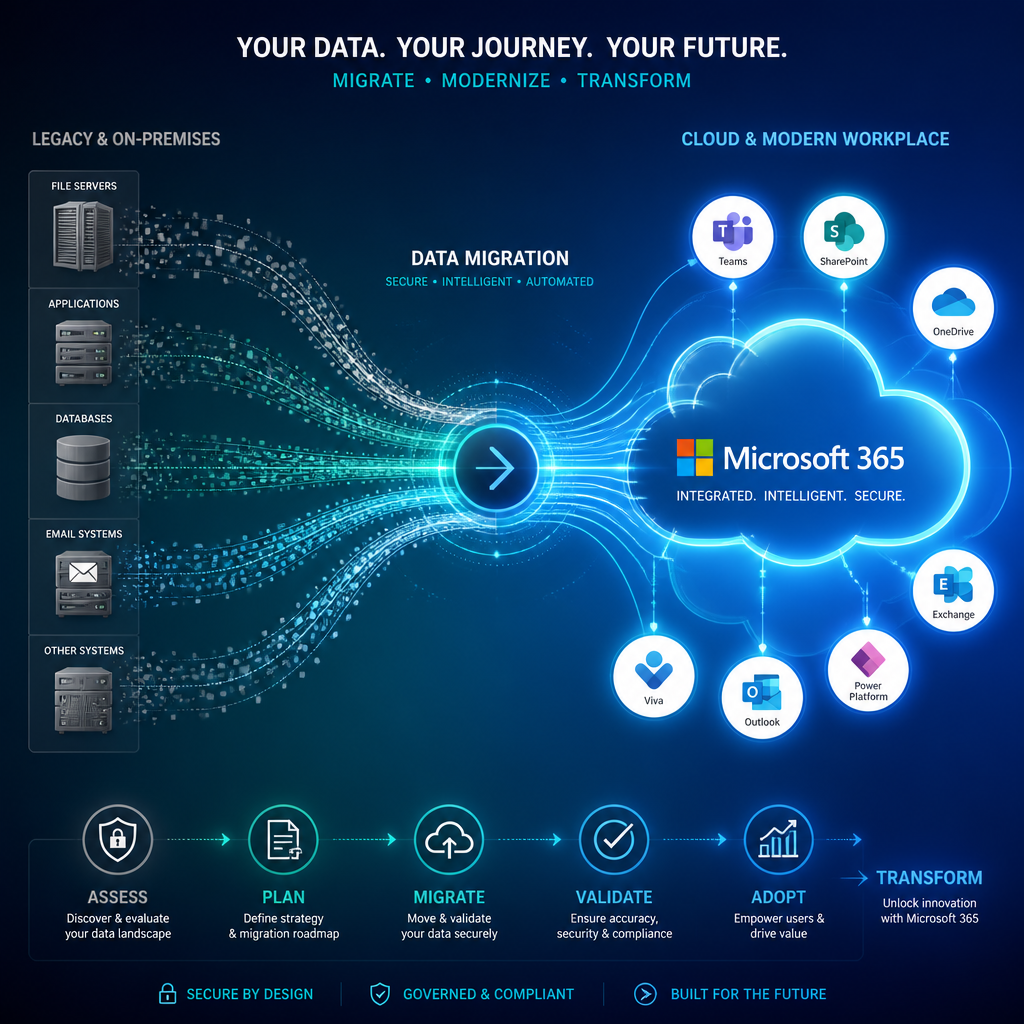
Microsoft 365 is an integrated suite of more than 30 applications and services delivered through the cloud. A migration to Microsoft 365 moves an organisation’s email, calendars, contacts, files, and collaboration tools from their current environment, whether that is an on-premises Exchange server, a legacy email host, Google Workspace, or a previous Microsoft 365 tenant, into a single, centrally managed platform.
For London SMEs, the practical outcome is significant. Staff access the same files from the office, from home, or from a client site. Email is delivered through Exchange Online with enterprise-grade uptime. Teams handles internal communication and video calls. SharePoint and OneDrive replace the need for a physical file server. All of this is managed through a single admin console, which is far simpler to maintain and audit than a patchwork of separate tools.
The migration itself involves four broad phases: pre-migration assessment, configuration of the target environment, data transfer, and post-migration validation. Each phase carries its own technical and operational considerations, and the quality of execution at each stage determines whether the transition is invisible to end users or disruptive to the business.

Migration Methods Compared
There is no single migration method that suits every organisation. The appropriate approach depends on the existing email platform, the number of mailboxes, and the acceptable level of disruption during transition. Three methods are used most frequently in practice.
Cutover Migration
Cutover migration moves all mailboxes and associated data to Microsoft 365 in a single operation, typically completed over a weekend. It is the appropriate method for organisations with approximately 150 mailboxes or fewer, running on-premises Exchange. It is fast, straightforward, and avoids a prolonged period of running two environments in parallel. The trade-off is that the cutover window must be carefully managed; any data created during the migration must be reconciled immediately after the move.
Staged Migration
Staged migration moves mailboxes in batches over a period of weeks. It suits organisations with between 150 and several hundred mailboxes that cannot afford a single large cutover event. Some users operate in Exchange Online while others remain on-premises temporarily, which requires directory synchronisation and careful management of routing rules to ensure mail delivery is uninterrupted throughout.
Hybrid Migration
A hybrid configuration creates a long-term coexistence between an on-premises Exchange environment and Exchange Online. It is primarily used by larger organisations or those with complex requirements, such as regulatory obligations that prevent moving certain data to the cloud entirely. For most London SMEs, hybrid is unnecessary and adds infrastructure complexity without proportionate benefit.
| Migration Method | Best Suited For | Key Consideration |
|---|---|---|
| Cutover | Fewer than approximately 150 mailboxes, on-premises Exchange | All data moves at once; requires a well-managed cutover window, typically a weekend |
| Staged | 150 to several hundred mailboxes, needing phased transition | Mail routing and directory sync must remain consistent throughout the batched process |
| Tenant-to-Tenant | Businesses merging, acquiring, or restructuring across two Microsoft 365 tenants | Identity mapping, domain reassignment, and permissions alignment are the critical failure points |
Planning Your Migration: The Steps That Matter
A migration fails in planning, not in execution. The businesses that experience downtime, data loss, or user confusion after an Office 365 migration are almost always those that moved too quickly through the assessment and preparation stages.
Pre-Migration Assessment
The assessment phase involves a full audit of the current environment: every mailbox, shared account, resource calendar, distribution group, public folder, and legacy application that connects to email or the file system. Orphaned mailboxes with no active owner should be reviewed and either migrated, archived, or removed before the move. Deprecated integrations and automations should be identified so they can be rebuilt or replaced in Microsoft 365 rather than carried across as technical debt.
Pro tip: Map every third-party application that authenticates against your current email or identity system before migration begins. Applications relying on basic authentication will fail against Exchange Online, which requires modern authentication protocols. Discovering these dependencies after cutover creates avoidable emergency work.
Licensing and Plan Selection
Microsoft 365 is available in several business tiers. Business Basic, Business Standard, and Business Premium each include different combinations of desktop applications, security features, and compliance tools. Business Premium, for example, includes Microsoft Defender for Business, which provides ransomware protection and advanced threat management, features that are absent from the lower tiers. Plan selection should be driven by security requirements and regulatory obligations, not simply by headline price per user.
Target Tenant Configuration
Before any data moves, the target Microsoft 365 tenant must be fully configured. This includes domain verification, Exchange Online setup, user provisioning, security policy configuration, and SharePoint or OneDrive structure planning. Cutting over into an incompletely configured tenant is one of the most common causes of post-migration remediation work.
Data Transfer and Delta Migrations
The initial data transfer moves the bulk of mailbox content. A delta migration then captures any items created or modified during the transfer window, ensuring nothing is lost between the start of the migration and the moment DNS records are updated to point to the new environment. Both stages should be validated against the source before DNS is changed.
Common Mistakes That Derail Office 365 Migration Projects
Practical experience of Microsoft 365 migration projects reveals a consistent pattern of avoidable errors. Understanding them in advance is the most direct way to prevent them.
Neglecting Email Archives
Organisations often have substantial volumes of archived email, sometimes spanning years of regulatory-relevant correspondence. Failing to plan how archives will be handled, whether they move to Exchange Online Archiving, remain on-premises, or are processed through a third-party tool, creates both compliance risk and unexpected migration delays. Archive planning must form part of the pre-migration assessment, not an afterthought.
Underestimating User Impact
A migration that is technically flawless can still produce a poor outcome if staff receive no preparation. Changes to Outlook configuration, OneDrive sync client behaviour, and file access paths all affect daily workflows. Effective communication before, during, and after the migration, combined with brief targeted training, measurably reduces support volume and accelerates adoption.
Leaving Security Configuration Until After Go-Live
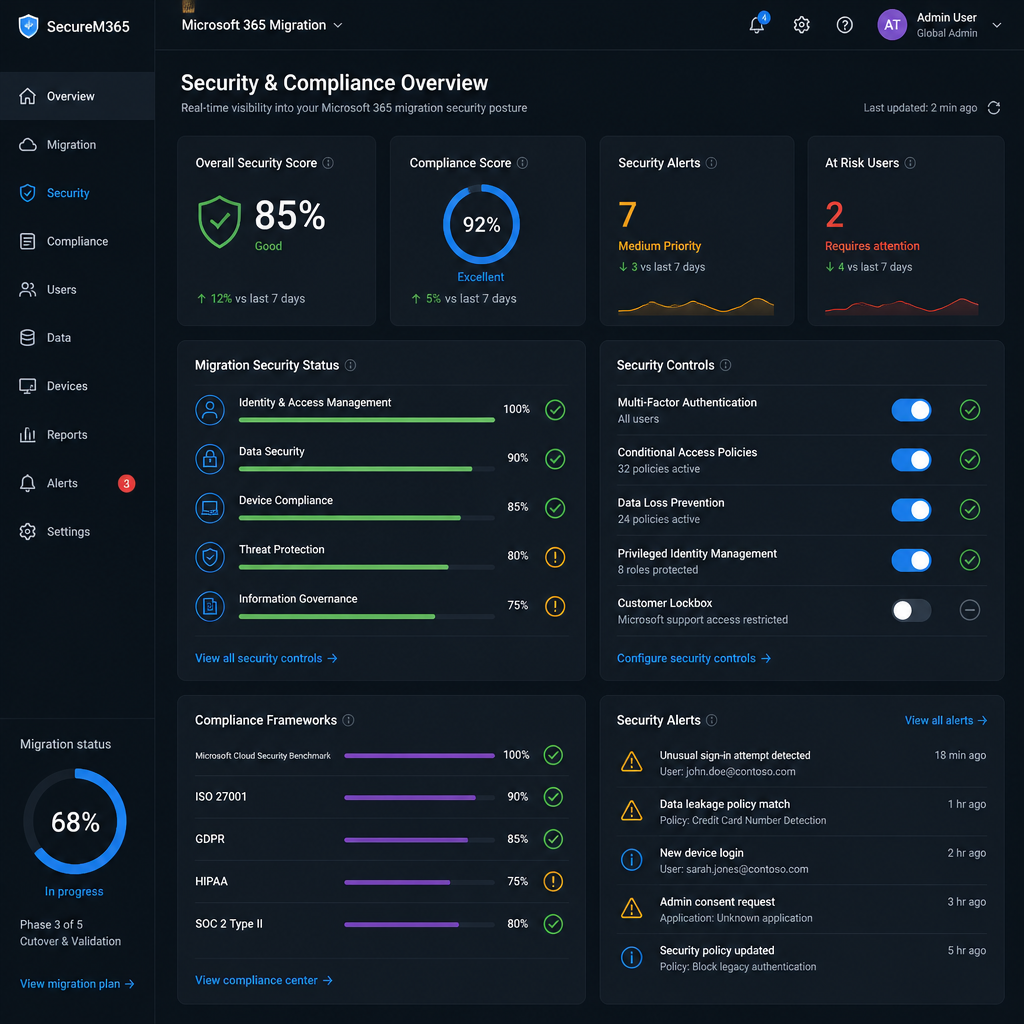
Once user accounts are live in Microsoft 365, they represent an active attack surface. Multi-factor authentication, secure sign-in policies, administrator role restrictions, and data loss prevention rules should all be in place before the first mailbox is cut over. Treating security configuration as a post-migration task is one of the most frequently observed and consequential errors in this type of project.
Pro tip: Enable MFA for all administrator accounts on day one of tenant setup, not at the end of migration. Admin accounts are the primary target in cloud environment compromises, and the window between tenant creation and full security configuration is when exposure is highest.
A migration that is technically complete but operationally underprepared creates exactly the conditions in which security incidents occur. The cutover moment is not the end of the project; it is the beginning of the operational phase, which must be secured from the outset.
Skipping Post-Migration Validation
Validating the migrated environment against the source, confirming that mail flow is correct, that shared mailboxes are accessible, that calendar data has transferred accurately, and that no items have been lost in the delta window, is the step most likely to be compressed under time pressure. It should be treated as non-negotiable. Defects identified within 24 hours of cutover are recoverable. Defects discovered weeks later are not.
Security and Compliance During Migration
For London SMEs, the migration window presents specific regulatory considerations. UK GDPR, administered by the Information Commissioner’s Office (ICO), requires that personal data is handled lawfully and securely throughout any transfer process. If the migration involves moving data that includes personal information about employees or clients, the organisation should confirm that data processing during the migration is covered by its existing data processing documentation or update it accordingly.
Microsoft’s UK data centres mean that data residency for most Microsoft 365 business plans keeps data within the United Kingdom, which simplifies UK GDPR compliance compared to some alternative platforms. However, data residency is not automatic for all workloads; it should be confirmed during tenant configuration with reference to Microsoft’s published data residency documentation.
Microsoft 365 Business Premium includes Microsoft Defender for Business, Exchange Online Protection against phishing and malware, and Intune device management, all of which should be activated as part of migration rather than deferred. For businesses in regulated sectors such as financial services or legal services, additional compliance features including eDiscovery, audit logging, and retention policies are available and should be configured in line with sector-specific requirements.
The National Cyber Security Centre (NCSC) publishes guidance on cloud security that is directly applicable to Microsoft 365 deployments. Its cloud security principles provide a practical framework for evaluating whether a Microsoft 365 configuration meets an acceptable baseline, and reviewing that guidance before finalising the migration configuration is a sound practice for any SME handling sensitive client data.
Choosing a Microsoft 365 Migration Consultant
Most London SMEs do not have the internal resource to plan and execute a Microsoft 365 migration alongside normal operations. The pre-migration assessment alone requires detailed knowledge of Exchange, Active Directory or Azure AD, DNS management, and Microsoft 365 licensing, all of which are specialist skills. Engaging a qualified Microsoft 365 migration consultant removes that burden and provides accountability for outcomes.
The right provider acts as an outsourced IT department throughout the migration engagement, not simply a technical team that completes tasks and moves on. That means involvement in licensing decisions, security configuration, user communication planning, post-migration support, and the quarterly technology reviews that ensure the platform continues to serve the business as it evolves.
When evaluating providers, the questions that matter most are: What is their approach to pre-migration assessment? How do they handle the security configuration of the target tenant? What does post-migration support look like, and for how long? Do they provide measurable SLAs for response times? A provider that cannot answer those questions clearly is unlikely to manage the migration with the rigour it requires.
iTO.London delivers managed IT services to London SMEs that include cloud system management across Microsoft 365, Azure, AWS, and GCP. Microsoft 365 migrations are handled as part of a broader engagement that includes security configuration, ongoing proactive monitoring, and a named engineer relationship, so the business retains continuity of support well beyond the migration date. For SMEs that want to understand the full scope of what a managed migration involves, the contact page is the appropriate starting point for a scoping conversation.
Frequently Asked Questions
How long does a Microsoft 365 migration take for a small London business?
For a business with fewer than 50 users migrating from on-premises Exchange or a legacy email host, the active data transfer typically takes a single weekend. The full project, including pre-migration assessment, tenant configuration, security setup, and post-migration validation, generally requires two to four weeks of planning and preparation before the cutover window. Compressing that preparation period is the most common cause of migration failures.
What is a Microsoft 365 tenant migration and when is it necessary?
A tenant-to-tenant migration moves data, users, and settings from one Microsoft 365 tenant to another. It is most commonly required following a business merger, acquisition, or rebrand where two separate Microsoft 365 environments must be consolidated. This is technically more complex than a straightforward on-premises-to-cloud migration because it requires identity mapping, domain reassignment, and careful permissions alignment across mail, SharePoint, Teams, and OneDrive. A specialist Microsoft 365 migration consultant should manage this type of project.
Will users lose access to email during the migration?
With a properly planned cutover migration, the period of email interruption is minimal, typically measured in minutes rather than hours, during the DNS update window. Users are usually notified in advance to reconfigure their Outlook profiles or are provided with pre-configured profiles by the IT team. Shared mailboxes, distribution groups, and resource calendars require specific validation steps to confirm access is restored correctly after cutover.
Does migrating to Microsoft 365 affect GDPR compliance?
Moving to Microsoft 365 does not create a GDPR compliance problem in itself, provided the migration is managed with appropriate data handling controls in place. Microsoft operates UK data centres and publishes detailed data processing agreements that are compatible with UK GDPR obligations. Organisations should review their existing data processing documentation and confirm that any personal data transferred during the migration is covered. The ICO website provides current guidance on cloud services and data residency that is directly applicable.
What is the difference between Office 365 migration and Microsoft 365 migration?
Office 365 was the former product name for what Microsoft now brands as Microsoft 365. The underlying services, Exchange Online, SharePoint Online, Teams, and OneDrive, are the same. The terms are used interchangeably in practice, and the migration process is identical regardless of which name is used. Microsoft completed the rebrand progressively from 2020, though some documentation and tools still reference the older name.
Can a Microsoft 365 migration be done without downtime?
Zero downtime in an absolute sense is not realistic for a cutover migration; there is always a brief window during DNS propagation when mail delivery may be delayed rather than delivered instantaneously. However, a well-managed migration schedules this window during off-peak hours, typically overnight or over a weekend, so that the practical impact on users is negligible. Staged and hybrid migrations reduce the risk further by moving groups of users incrementally, but they extend the overall project duration.
If you have recently managed a Microsoft 365 migration for your London business, or are currently evaluating your options, we welcome your questions and observations in the comments below.
References
- Microsoft 365 business plans and features compared on the official Microsoft UK site
- Detailed overview of Exchange to Microsoft 365 migration methods, including cutover, staged, and hybrid approaches
- Microsoft 365 migration guidance for SMEs covering security configuration requirements
- Comprehensive guide to Microsoft 365 tenant-to-tenant migration for IT leaders
- Office 365 migration checklist covering pre-migration planning through post-migration validation