

Many London SMEs are already paying for Microsoft 365, yet still running a separate telephone contract alongside it. That duplication costs money, complicates IT management, and creates a fragmented experience for staff and customers alike. Microsoft Teams Phone resolves that overlap by turning the collaboration platform your team already uses into a fully featured business phone system, complete with auto attendants, call queues, voicemail transcription, and number portability. This guide explains how the system works, how to connect it to the public telephone network, what it costs, and how to migrate without disruption. Throughout, the guidance is written from a practical implementation standpoint, drawing on the experience of deploying Microsoft Teams support across London businesses of varying sizes.
Table of Contents
- Quick Takeaways
- What Is Microsoft Teams Phone and How Does It Replace a Traditional PBX?
- PSTN Connectivity Options: Calling Plans, Direct Routing, and Operator Connect
- Key Features Every London SME Should Configure
- Cost Breakdown: What You Will Actually Pay
- Migration Approach: Moving From a Legacy Phone System
- Network Requirements for Reliable VoIP Quality
- Frequently Asked Questions
- References
Quick Takeaways
| Key Insight | Explanation |
|---|---|
| Teams Phone requires a separate add-on licence | A standard Microsoft 365 subscription does not include external calling. The Teams Phone Standard add-on, priced at approximately £6 per user per month, is required to unlock PSTN features. |
| Three ways to connect to the public network | Microsoft Calling Plans, Operator Connect, and Direct Routing each suit different business sizes and existing infrastructure. Choosing incorrectly increases cost and complexity. |
| Existing phone numbers can be ported | UK geographic and non-geographic numbers can be ported into Teams Phone, so businesses do not need to change published contact details. |
| Auto attendants should remain shallow | Menu trees of more than three levels frustrate callers. Keeping call flows concise improves the caller experience and reduces abandoned calls. |
| Network quality directly determines call quality | Packet loss above 1% causes audible voice degradation. Quality of Service (QoS) policies must be configured before go-live. |
| A phased migration reduces risk | Running a controlled pilot of Teams Phone with a small user group before full deployment surfaces configuration issues without affecting the whole business. |
| Teams Phone consolidates tools and costs | Replacing a separate PBX or hosted VoIP contract with Teams Phone typically eliminates hardware maintenance, reduces per-seat telephony costs, and removes a vendor relationship. |
What Is Microsoft Teams Phone and How Does It Replace a Traditional PBX?
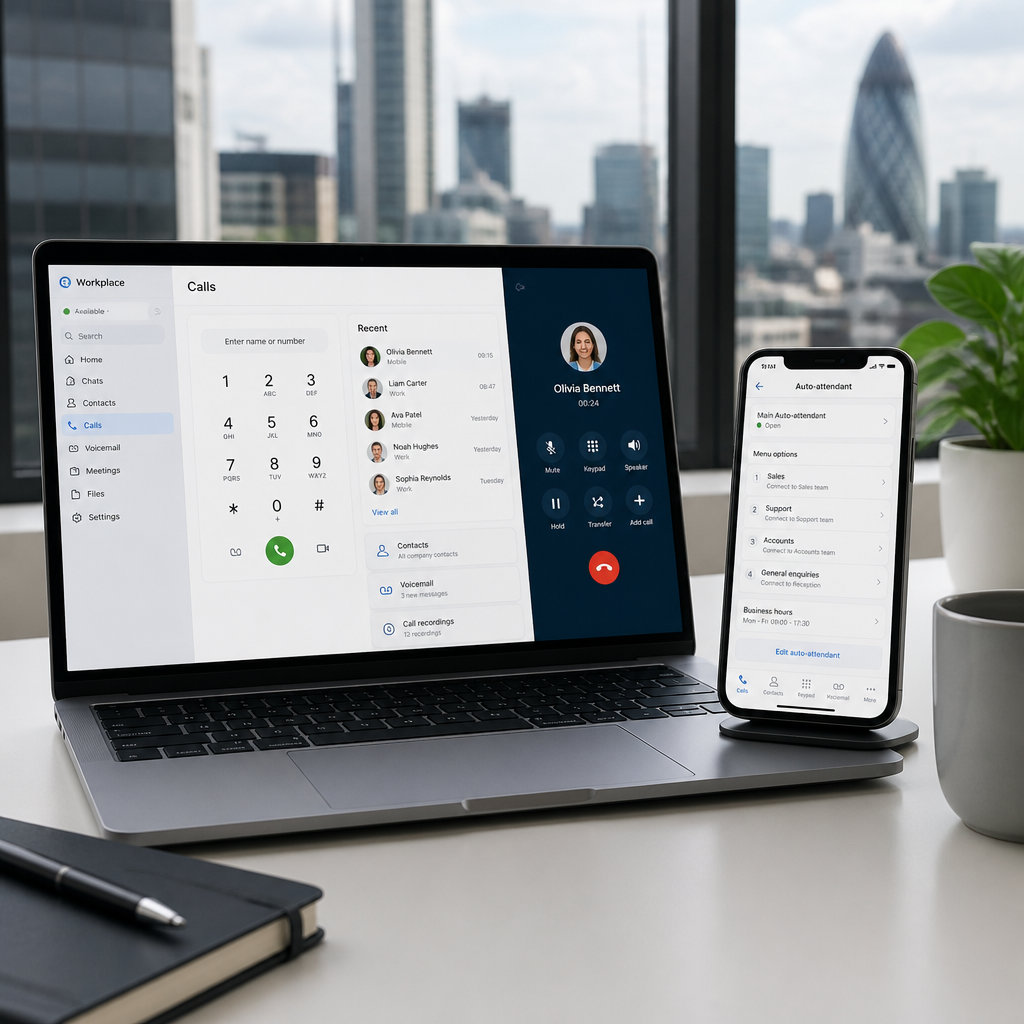
A traditional Private Branch Exchange (PBX) is a physical or on-premise device that manages internal extensions and routes calls to and from the public telephone network. Microsoft Teams Phone is a cloud-based PBX replacement hosted entirely within Microsoft’s infrastructure. It provides dial tone, call control, transfer, hold, park, forwarding, auto attendants, call queues, and voicemail, all delivered through the Teams client on desktop, mobile, or a certified desk phone.
For a London SME, the practical implication is significant. There is no on-site hardware to maintain, no costly engineer call-outs for moves and changes, and no separate system for IT to manage. Staff make and receive calls from the same application they use for meetings, chat, and file collaboration. A Microsoft Teams consultant configuring the system can replicate virtually every feature a traditional PBX provides, while adding capabilities, such as voicemail transcription and integrated call analytics, that legacy hardware rarely supports.
The system operates as a Software-as-a-Service platform, meaning Microsoft handles availability, security patching, and capacity. For businesses without a dedicated internal IT function, that removes a significant operational burden.

PSTN Connectivity Options: Calling Plans, Direct Routing, and Operator Connect
Teams Phone on its own cannot make external calls until it is connected to the Public Switched Telephone Network (PSTN). There are three distinct methods for establishing that connection, each with different cost and complexity profiles.
Microsoft Calling Plans
Microsoft provides the phone numbers and call minutes directly. The business purchases a Calling Plan add-on alongside the Teams Phone Standard licence. Domestic Calling Plans for UK businesses cost approximately £5 to £9 per user per month and include a UK phone number along with an allocation of inclusive minutes. This is the simplest option to administer, managed entirely within the Teams Admin Centre, and suits smaller businesses with straightforward calling requirements. The limitation is that Microsoft’s own call rates apply, and international calling flexibility is restricted.
Operator Connect
Operator Connect allows a Microsoft-certified telecommunications operator to provide PSTN connectivity through a direct, managed integration with Teams. The operator manages the carrier infrastructure, and the business administers numbers and assignments through the standard Teams Admin Centre without needing to deploy any additional hardware. This option combines operational simplicity with the pricing and flexibility of a third-party carrier, making it an increasingly practical choice for growing London businesses.
Direct Routing
Direct Routing connects Teams Phone to any compatible telephone carrier using Session Initiation Protocol (SIP) trunking, routed through a Session Border Controller (SBC). This option offers the greatest flexibility, including the ability to keep an existing carrier contract, access competitive per-minute rates, and integrate with legacy on-premise PBX hardware during a transition period. The trade-off is added technical complexity, as the SBC must be correctly configured and maintained. Direct Routing is typically the right choice for businesses with complex call flow requirements, existing carrier relationships, or multi-site telephony.
Choosing the wrong PSTN connectivity method is the single most common and costly mistake in a Teams Phone deployment. The decision should be made before licensing is purchased, not after.
Key Features Every London SME Should Configure
A Teams phone system deployment that only activates basic calling leaves substantial value unused. The following features are available to all businesses with the Teams Phone Standard licence and should be considered standard configuration, not optional extras.
Auto Attendants
Auto attendants present callers with a voice menu, routing them to the correct department or person without requiring a receptionist to answer every call. They support custom greetings, business hours schedules, out-of-hours routing, and dial-by-name directories. Menu trees should be kept to a maximum of three levels, as deeper hierarchies increase abandoned calls and caller frustration.
Call Queues
Call queues hold inbound calls in order while agents become available, playing hold music or a custom message in the interim. Queues can overflow to another queue, an auto attendant, or voicemail if wait times exceed a defined threshold. For service-oriented businesses, configuring overflow conditions and timeout handling properly is essential to maintaining a professional caller experience.
Voicemail and Transcription
Cloud voicemail integrates natively with Teams and Outlook. Transcription converts voice messages to text, allowing staff to read messages in low-noise environments or during meetings. This is particularly useful for field-based or mobile workers operating across London.
Shared Line Appearance and Call Delegation
Shared Line Appearance allows multiple devices to ring simultaneously for a single number, while call delegation enables assistants to manage calls on behalf of a named manager. Both features replicate common PBX capabilities that businesses frequently rely on and may overlook when assessing whether Teams Phone meets their needs.

Cost Breakdown: What You Will Actually Pay
The total cost of a Microsoft Teams VoIP deployment is composed of two distinct elements: the Teams Phone licence per user, and PSTN connectivity. These are separate line items, and proposals that only quote one or the other are incomplete.
| Connectivity Option | Who Manages PSTN | Best Suited For |
|---|---|---|
| Microsoft Calling Plans | Microsoft directly | Small businesses with simple UK-only calling, minimal existing carrier ties, wanting one-vendor administration |
| Operator Connect | Microsoft-certified operator | Businesses wanting third-party carrier pricing and flexibility with simplified admin centre management and no SBC hardware |
| Direct Routing via SBC | Any compatible SIP carrier via SBC | Businesses with existing carrier contracts, complex multi-site call flows, or legacy PBX hardware still in use |
The Teams Phone Standard licence is approximately £6 per user per month, as an add-on to an existing Microsoft 365 subscription. PSTN connectivity costs vary by provider and call volume. Domestic Calling Plans from Microsoft are priced at roughly £5 to £9 per user per month for UK calls. Operator Connect and Direct Routing rates vary by carrier and usage profile. Businesses should request itemised proposals covering licence fees, PSTN charges, and any SBC provisioning or management costs before committing.
Pro tip: Not every user needs external calling capability. Configuring Teams Phone Standard licences only for users who genuinely make or receive external calls, and using Resource Accounts for shared numbers such as auto attendants and call queues, keeps licence spend proportionate to actual requirements.
Migration Approach: Moving From a Legacy Phone System
A direct, same-day cutover from a legacy PBX or hosted VoIP system to Teams Phone carries substantial risk for a business that depends on telephony for customer contact. A structured, phased migration approach is consistently more reliable in practice.
Phase One: Audit and Design
Before any licence is purchased, a full audit of the existing telephony environment is necessary. This means documenting every number in use, every call flow, every hunt group, every auto attendant menu, and every carrier contract and its notice period. Incomplete audits at this stage are the primary cause of number porting failures and missed call flow requirements discovered only after go-live.
Phase Two: Pilot Deployment
A controlled pilot deploys Teams Phone to a small group of users, typically those with less customer-facing exposure, and runs for two to four weeks. The pilot validates network quality, tests auto attendant and call queue configuration, confirms voicemail setup, and surfaces any device or headset compatibility issues before the wider business is affected.
Phase Three: Phased Rollout and Number Porting
Remaining users are migrated in cohorts, with number porting scheduled carefully to avoid gaps in availability. In the UK, number porting to Teams Phone is supported for geographic and non-geographic numbers, and the porting timeline should be confirmed with the receiving carrier before communicating any transition dates to staff or customers.
Pro tip: Retain read access to the legacy phone system’s call logs for at least 30 days after migration. Call data from the old system is frequently needed to resolve disputes about missed calls or to validate that routing has been configured correctly in Teams.
Network Requirements for Reliable VoIP Quality
Call quality in a Microsoft Teams business phone deployment is determined by network conditions, not by Teams configuration alone. Businesses that deploy Teams Phone on a network not prepared for real-time voice traffic will experience poor call quality regardless of how well the system is configured.
The critical network metric is packet loss, which should remain below 1%. Even packet loss of 2 to 3 per cent causes audible degradation, cutting out words and introducing distortion that undermines caller confidence. Jitter and latency also affect voice quality. Microsoft publishes specific network requirements for Teams audio, and any deployment should include a network readiness assessment before go-live.
Quality of Service (QoS) policies that prioritise voice traffic are essential on congested networks. Without QoS, voice packets compete equally with file downloads, software updates, and video streams, and call quality suffers accordingly. Businesses operating on shared consumer broadband connections should consider upgrading to a dedicated business connection before migrating telephone traffic onto the network.
At iTO.London, the pre-migration network assessment is a standard part of every Teams Phone deployment engagement. Identifying network gaps before go-live, rather than troubleshooting call quality complaints after, protects the business’s reputation with its customers and avoids the cost of revisiting infrastructure post-deployment. For businesses seeking broader Microsoft Teams support, including ongoing monitoring and administration, a managed IT partner removes the operational overhead of managing these systems internally.
Frequently Asked Questions
Does Microsoft Teams come with a phone system included in my Microsoft 365 subscription?
No. Standard Microsoft 365 subscriptions include Teams for meetings and internal calls, but external calling to and from telephone numbers requires the Teams Phone Standard add-on licence, which is a separate, additional cost per user. PSTN connectivity, whether through a Microsoft Calling Plan, Operator Connect, or Direct Routing, must also be configured and is billed separately.
Can I keep my existing business phone numbers when switching to Teams Phone?
Yes. UK geographic and non-geographic numbers can be ported to Teams Phone through Microsoft’s number porting process or via a carrier using Operator Connect or Direct Routing. The porting timeline varies by carrier but should be confirmed before communicating any transition dates to customers or stakeholders. Number porting failures caused by incomplete documentation are a common and avoidable migration risk.
What is the difference between Operator Connect and Direct Routing?
Operator Connect uses a Microsoft-certified operator that connects to Teams through a direct, managed integration, with all administration handled in the Teams Admin Centre and no SBC hardware required on the customer side. Direct Routing connects Teams to any compatible SIP carrier through an SBC that must be provisioned and maintained, either by an IT partner or internally. Operator Connect is simpler to manage; Direct Routing offers greater carrier choice and flexibility for complex telephony environments.
How many users can Teams Phone support for a London SME?
Teams Phone scales from single-user deployments to thousands of users. For most London SMEs, the practical constraint is not the platform’s capacity but rather the time required to design call flows, configure auto attendants and call queues correctly, and manage number porting. The system itself imposes no meaningful ceiling for businesses of the sizes typically operating in the London SME market.
What happens to calls if the internet connection goes down?
If the internet connection fails, Teams Phone calls cannot be made or received from desktop or laptop clients. Mobile users with a cellular data connection can continue to use the Teams mobile application. Businesses with high-availability telephony requirements should consider a secondary broadband connection or 4G/5G failover, as well as configuring call forwarding to mobile numbers as a contingency within the Teams Admin Centre.
Is Microsoft Teams Phone suitable for businesses that still use desk phones?
Yes. Teams Phone is compatible with a range of Microsoft-certified IP desk phones. These devices register directly with Teams and function as extensions within the same call routing environment as software clients. Businesses transitioning from a legacy PBX can retain physical handsets for staff who prefer them, while others use headsets with the desktop or mobile app. During a Direct Routing deployment, legacy desk phones can also be retained on the existing PBX while Teams Phone is adopted gradually.
If your business is evaluating Teams Phone or working through a migration, we welcome questions and observations from IT decision-makers who have navigated this process, whether the experience was straightforward or more complicated than anticipated.
We would love your feedback and any insights you would share with others. What perspective would you add?
References
- Microsoft documentation on planning for Operator Connect in Teams Phone deployments
- UK-focused explanation of Microsoft Teams Calling Plans, costs, and when to use Direct Routing
- Comprehensive guide to Microsoft Teams Phone System features including auto attendants and call queues
- Practical best practices for Microsoft Teams Phone System configuration and PSTN migration
- Microsoft Tech Community checklist for Teams Voice migration planning for IT leaders